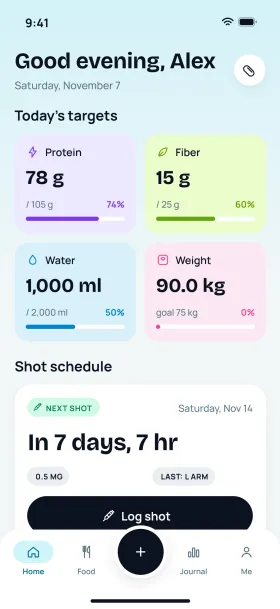
Short answerTo log a shot in Penvia: pick the dose you use, tap the injection site on the body map, save. That is all.
The three taps
- Pick the dose you use. Penvia records the number you choose. It never suggests one.
- Tap the site on the body map. Penvia shows the site you used least recently.
- Save. The home screen now counts down to your next shot.
After you log
- A reminder arrives on shot day, with two follow-ups if you have not logged.
- If a shot is overdue, Penvia shows an overdue state, so a missed shot is easy to see. Ask your doctor or pharmacist what to do about a missed dose.
- Your Journal shows shots, protein days, weight and day cards for the week.
- Pro adds a supply tracker (how many doses you have left and when you may run out) and a two-page doctor report (PDF) with your dose timeline, weight, side effects and shot table.
Your data
Stays on your phone. No account, no ads, no analytics. Export it all as CSV for free.
Penvia is a log, not a calculator.
Questions
How do I log a GLP-1 shot in Penvia?
Pick the dose you use, tap the injection site on the body map, and save. The home screen then shows a countdown to your next shot.
What happens if a shot is overdue?
Penvia shows an overdue state, so a missed shot is easy to see. It does not tell you what to do about it. Ask your doctor or pharmacist.
Can I export my shot history?
Yes. Export all your data as a CSV file for free. Pro adds a two-page doctor report PDF with your dose timeline, weight, side effects and shot table.
Does the shot log suggest a dose?
No. Penvia is a log, not a calculator.